
SMS integration for AD SelfServicePlus

Send SMS messages from AD SelfServicePlus via SureSMS.
Integration to AD SelfServicePlus from ManageEngine
It's easy to integrate SureSMS with AD SelfServicePlus from ManageEngine. You can find information about AD SelfServicePlus here.
In SureSMS you need to do the following
- Create a SureSMS account if you haven't already done so. Click here to create an SMS Gateway account.
- Find your SureSMS login, password and sender name. You will need these in the setup in AD SelfServicePlus.
In AD SelfServicePlus you need to do the following
- Go to "AD Self Service Manager" and select "Setup".
- Go down to the "SMS Gateway Provider list" section.
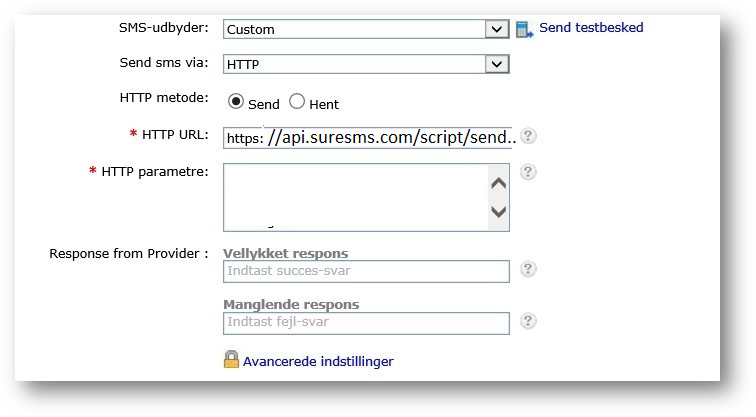
- Select "Custom" as SMS provider and choose to send via HTTP. The HTTP method must be set to SEND.
- In the HTTP URL field, type in:
https://api.suresms.com/Script/SendSMS.aspx
- In the HTTP Parameter field, type in:
login=[ditsuresmslogin]&password=[ditsuresmspassword]&to=+45%mobNo%&from=[dinsuresmssender]&Text=%message%
Important settings
Replace ditsuresmslogin, ditsuresmspassword and dinsuresms sender with your own account details from SureSMS and remove the square brackets.
Also remember to check "Convert message to Unicode" under advanced settings.
If you have any problems, please write to [email protected], We'd love to help.